JesusProxy Connect Helper
Use SOCKS5 proxies with a username and password in Google Chrome and Microsoft Edge. Chrome and Edge can't send a SOCKS5 login from an extension; this free helper for Windows and Mac does it for them, together with the free JesusProxy Connect extension. It works with proxies from any provider. On Firefox you don't need it.
Version 1.0.1 · Free · No account needed · Privacy
First, the easy options
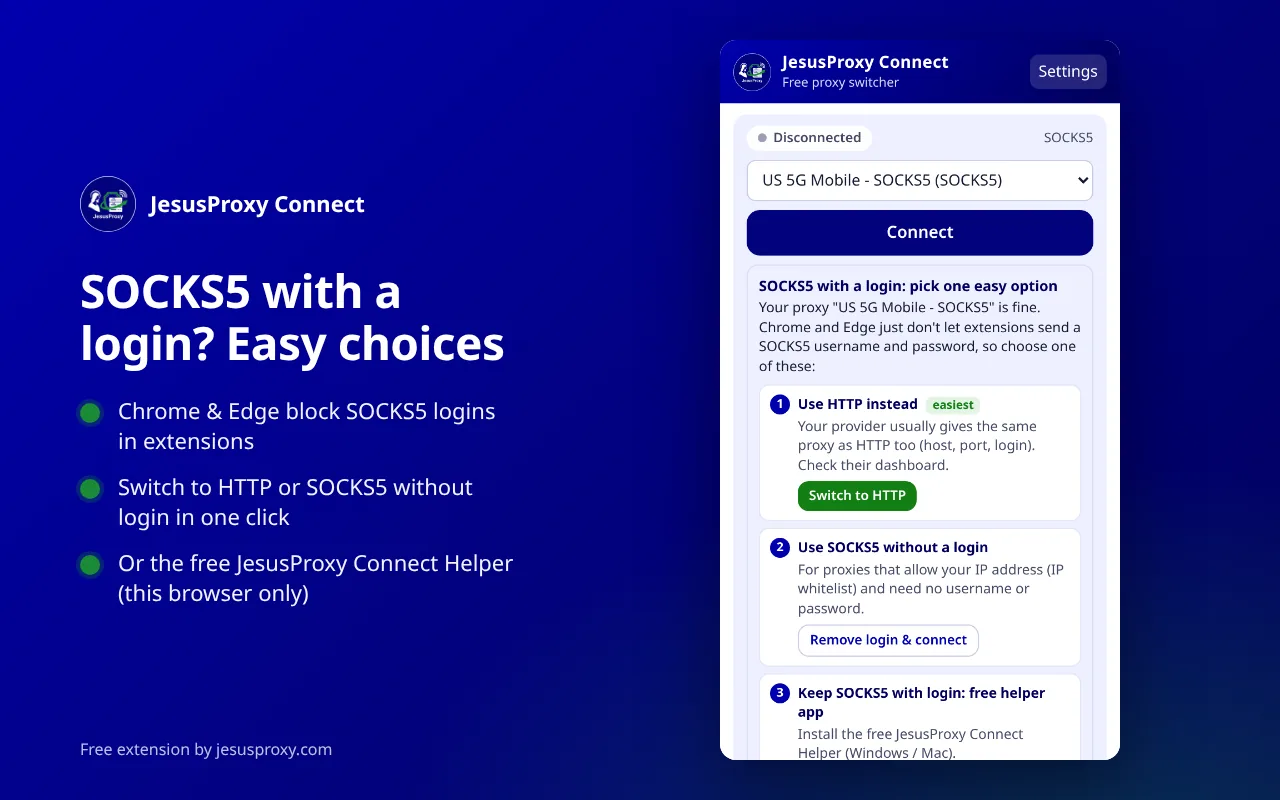
You may not need the helper at all. When you pick a SOCKS5 proxy with a login in Chrome or Edge, the extension shows these choices before it connects.
- Use HTTP instead (easiest). Most providers give the same proxy as HTTP too. One click switches the form to HTTP with host and login filled in; add the HTTP port from your provider's dashboard.
- Use SOCKS5 without a login. If your proxy allows your IP address (IP whitelist), remove the login and connect.
- Keep SOCKS5 with a login: install the free helper. Download it above, run it once, then press "I installed it, connect" in the extension.
Using Firefox? SOCKS5 with a login works there without the helper.
Why it's needed, and why it's safe
- Why it's neededChrome and Edge block SOCKS5 passwords in extensions. The helper passes the login to your proxy for them.
- Only on this computerIt listens only on 127.0.0.1. No website and no other computer can reach it.
- Only this extensionIt accepts connections only from JesusProxy Connect, which holds a private local key. Other programs are refused.
- Only this browserIt carries only the traffic of the browser where the extension is connected. Other apps and your Windows or macOS proxy settings are never touched.
- No passwords storedYour proxy login stays in memory only. No tracking, no telemetry, and it never contacts JesusProxy by itself.
- Uninstall anytimeWindows: Settings, Apps. Mac: uninstall.command. The extension then simply offers the other options again.
Install in 2 minutes
Windows
- Download the Windows installer and open it.
- If Windows SmartScreen says "Windows protected your PC", click More info, then Run anyway. (The helper is new and not code-signed yet, so Windows doesn't know it.)
- Click Next and Finish. No administrator password is needed. The JesusProxy icon appears next to the clock.
- In JesusProxy Connect, press I installed it, connect (or restart Chrome or Edge once). The popup shows "via JesusProxy Connect Helper".
Mac
- Download the Mac ZIP and open it.
- Right-click install.command, choose Open, then Open again. (macOS asks because the helper is not notarized yet.)
- The helper is installed in the Applications folder in your home folder and starts when you log in.
- Restart Chrome or Edge once, then connect your SOCKS5 proxy in JesusProxy Connect.
Don't have the extension yet? Get the free JesusProxy Connect extension for Chrome, Edge or Firefox first. Helper 1.0.1 needs extension 1.0.4 or later.
Questions and answers
Is it really free?
Yes. JesusProxy Connect and the helper are free, with no ads and no account. They work with any SOCKS5 or HTTP proxy, from any provider.
Does the helper collect data?
No. It has no tracking and no telemetry, and it never writes your proxy login to disk or to its log. The login is kept in memory only; after a restart the extension hands it over again.
Does it change my system proxy or carry other apps?
No. Only the browser where JesusProxy Connect is installed uses it: the extension sets the proxy for that browser only, and the helper never changes your Windows or macOS proxy settings. Its local port (127.0.0.1) refuses every connection that does not carry the private key it gave to the extension, so other apps on your computer cannot use it.
Do I need it in Firefox?
No. Firefox sends SOCKS5 logins from extensions on its own, so JesusProxy Connect for Firefox works without the helper.
Will it slow my connection down?
No. The helper only passes data between your browser and your proxy on your own computer. In our tests, download speed was the same as connecting directly, and new connections were often faster because the helper sends the SOCKS5 login in one step.
Can I use it without JesusProxy proxies?
Yes. It works with any SOCKS5 proxy that needs a username and password.
How do I remove it?
Windows: Settings, Apps, "JesusProxy Connect Helper", Uninstall. Mac: run uninstall.command from the download.
Need a proxy? See JesusProxy US 5G mobile proxy plans.
Other downloads and checksums (SHA-256)
Windows on ARM, no installer (ZIP, 7.5 MB) · SHA256SUMS-v1.0.1.txt
- JesusProxyConnectHelper-v1.0.1-windows-x64-setup.exe: 5ddd1fa436af172825a9a50e9ec189f17f31bcfe44f375992762c6480df9ba1e
- JesusProxyConnectHelper-v1.0.1-windows-arm64-setup.exe: e6dd7e46162bd98280fabfd5d2a35f23f393727f3323f73887c2b40fc8e178b9
- JesusProxyConnectHelper-v1.0.1-macos-universal.zip: c484e0b7c7b739277eb60a5542f5292d348afed0ffce2869b88d31c290ff24bb
- JesusProxyConnectHelper-v1.0.1-windows-x64.zip: ae894901284e0a509db0c59038ef99545ab0c40d4f4a94f6d7bb27e70c8b2f02
- JesusProxyConnectHelper-v1.0.1-windows-arm64.zip: 62db4d61fb89514824ad7f131cee4513e53ffcff051b521ac27e5bac29d4aa2f